

Contributed by Ishan Singh on 2025-11-18
This cookbook guides you through how to deploy a Strands Agent to Amazon Bedrock AgentCore Runtime with built-in observability. The implementation uses Amazon Bedrock Claude models and sends telemetry data to Braintrust through OpenTelemetry.
By the end of this cookbook, you’ll learn how to:
- Build a Strands Agent with web search capabilities using Amazon Bedrock Claude models
- Deploy the agent to Amazon Bedrock AgentCore Runtime for managed, scalable hosting
- Configure OpenTelemetry to send traces to Braintrust for observability
- Invoke the agent through both SDK and boto3 client
Key components
- Strands Agent: Python framework for building LLM-powered agents with built-in telemetry support
- Amazon Bedrock AgentCore Runtime: Managed runtime service for hosting and scaling agents on AWS
- OpenTelemetry: Industry-standard protocol for collecting and exporting telemetry data
Architecture
The agent is containerized and deployed to Amazon Bedrock AgentCore Runtime, which provides HTTP endpoints for invocation. Telemetry data flows from the Strands Agent through OTEL exporters to Braintrust for monitoring and debugging. The implementation uses a lazy initialization pattern to ensure proper configuration order.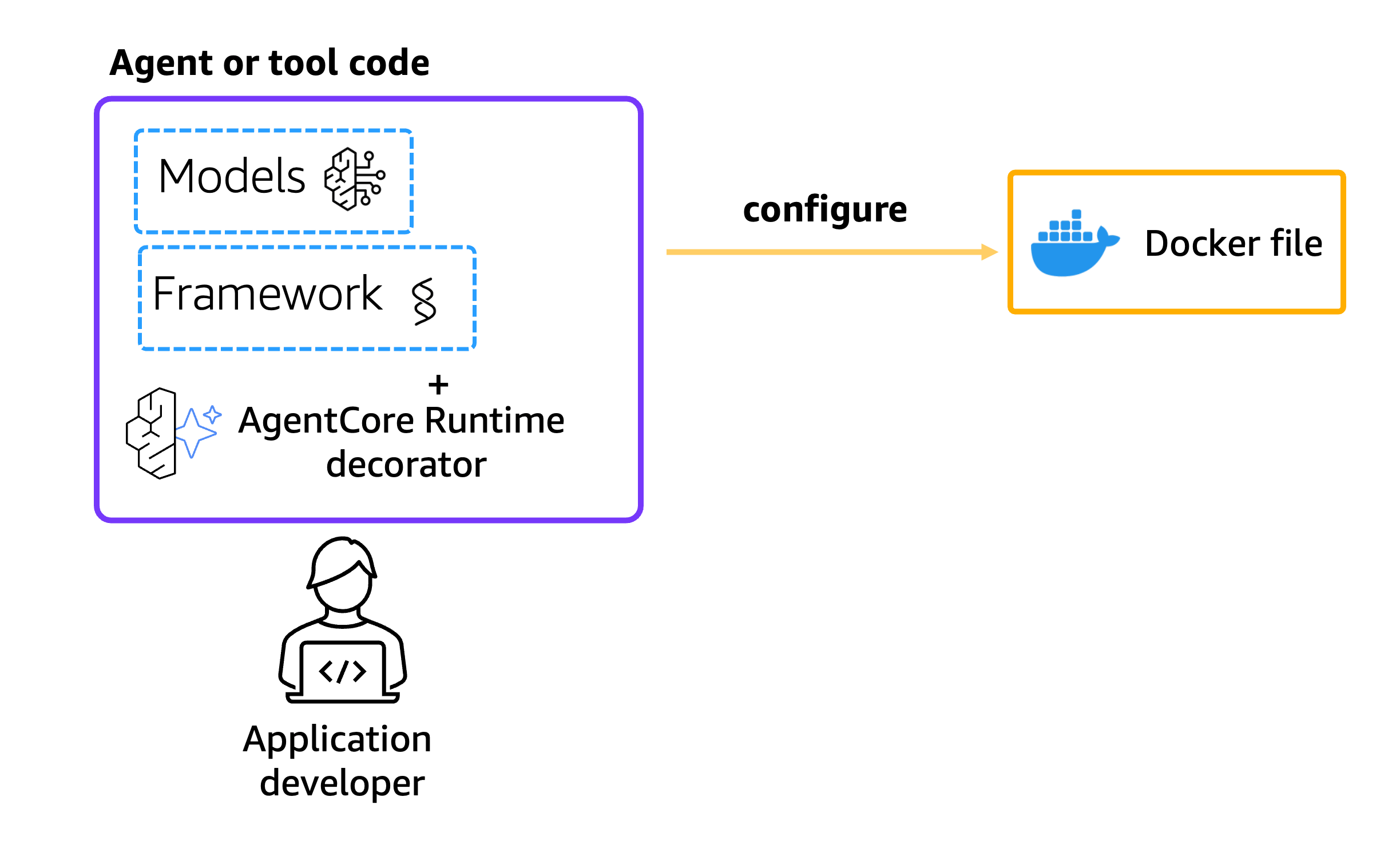
Getting started
To get started, make sure you have:- Python 3.10+
- AWS credentials configured with Bedrock and AgentCore permissions
- A Braintrust account and API key
- Docker installed locally
- Access to Amazon Bedrock Claude models in us-west-2
requirements.txt file:
Agent implementation
The agent file (strands_claude.py) implements a travel agent with web search capabilities. The implementation uses a lazy initialization pattern to ensure telemetry is configured after environment variables, integrates Amazon Bedrock Claude models through the Strands framework, and includes web search via DuckDuckGo for real-time information. The agent is configured to send traces to Braintrust via OpenTelemetry:
Configure AgentCore runtime deployment
Next we’ll use the starter toolkit to configure the AgentCore Runtime deployment with an entrypoint, the execution role, and a requirements file. We’ll also configure the starter kit to auto-create the Amazon ECR repository on launch. During the configure step, your Dockerfile will be generated based on your application code.When using the
bedrock_agentcore_starter_toolkit to configure your agent, it configures AgentCore Observability by default. To use Braintrust, you need to disable AgentCore Observability by setting disable_otel=True.Deploy to AgentCore runtime
Now that we have a Dockerfile, let’s launch the agent to the AgentCore Runtime. This will create the Amazon ECR repository and the AgentCore Runtime.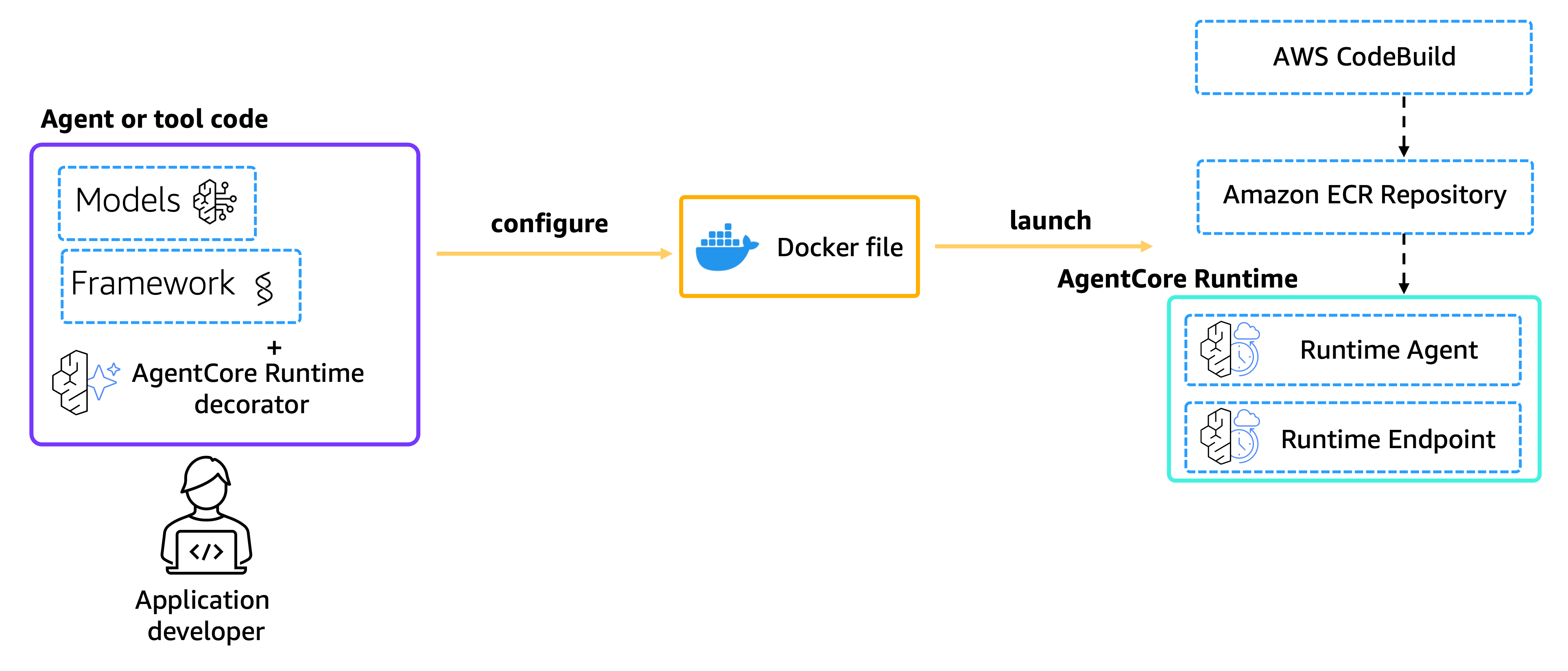
Configure observability
To enable observability, we need to configure the OpenTelemetry endpoint and authentication. The agent will send traces to Braintrust using the OTEL protocol.Check deployment status
Wait for the runtime to be ready before invoking:Invoke the agent
Finally, we can invoke our AgentCore Runtime with a payload.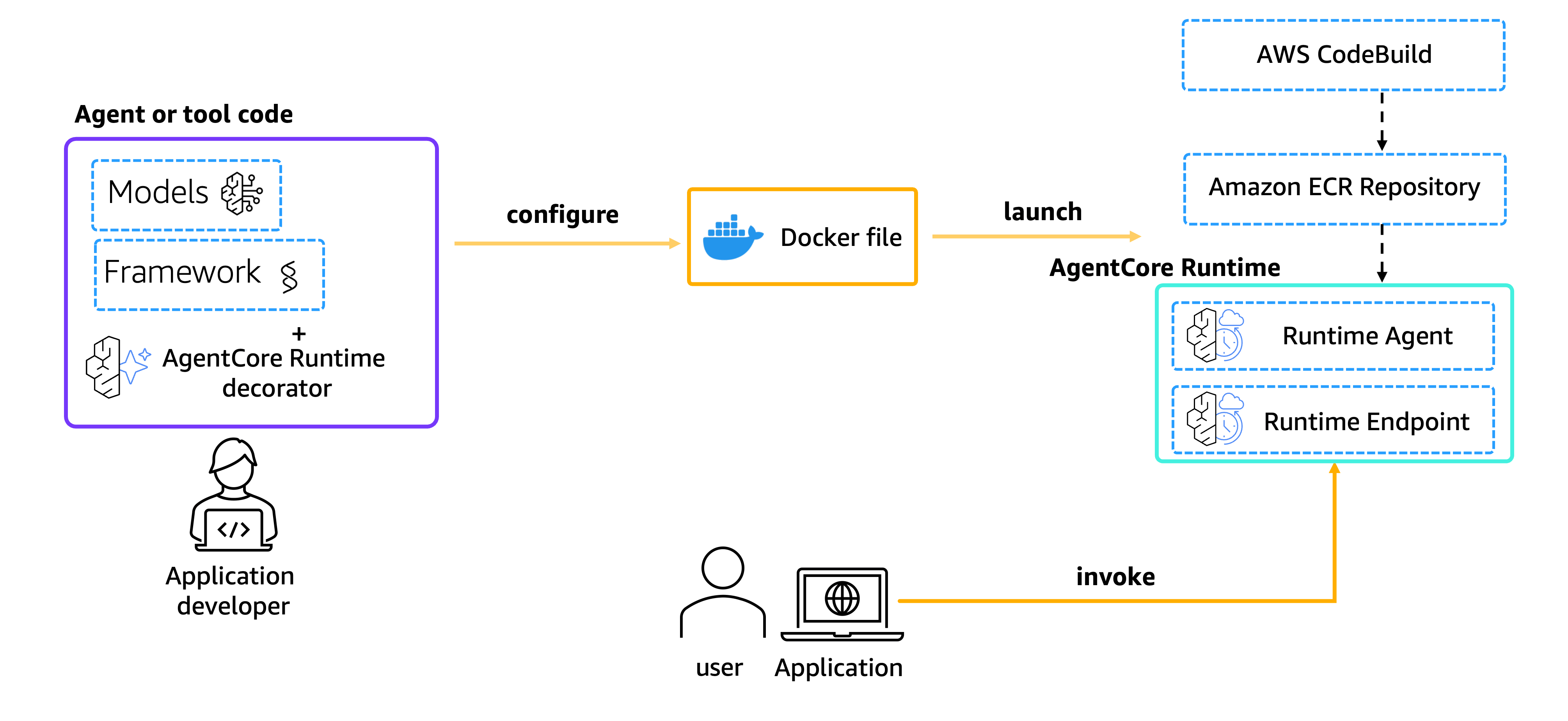
Logging in Braintrust
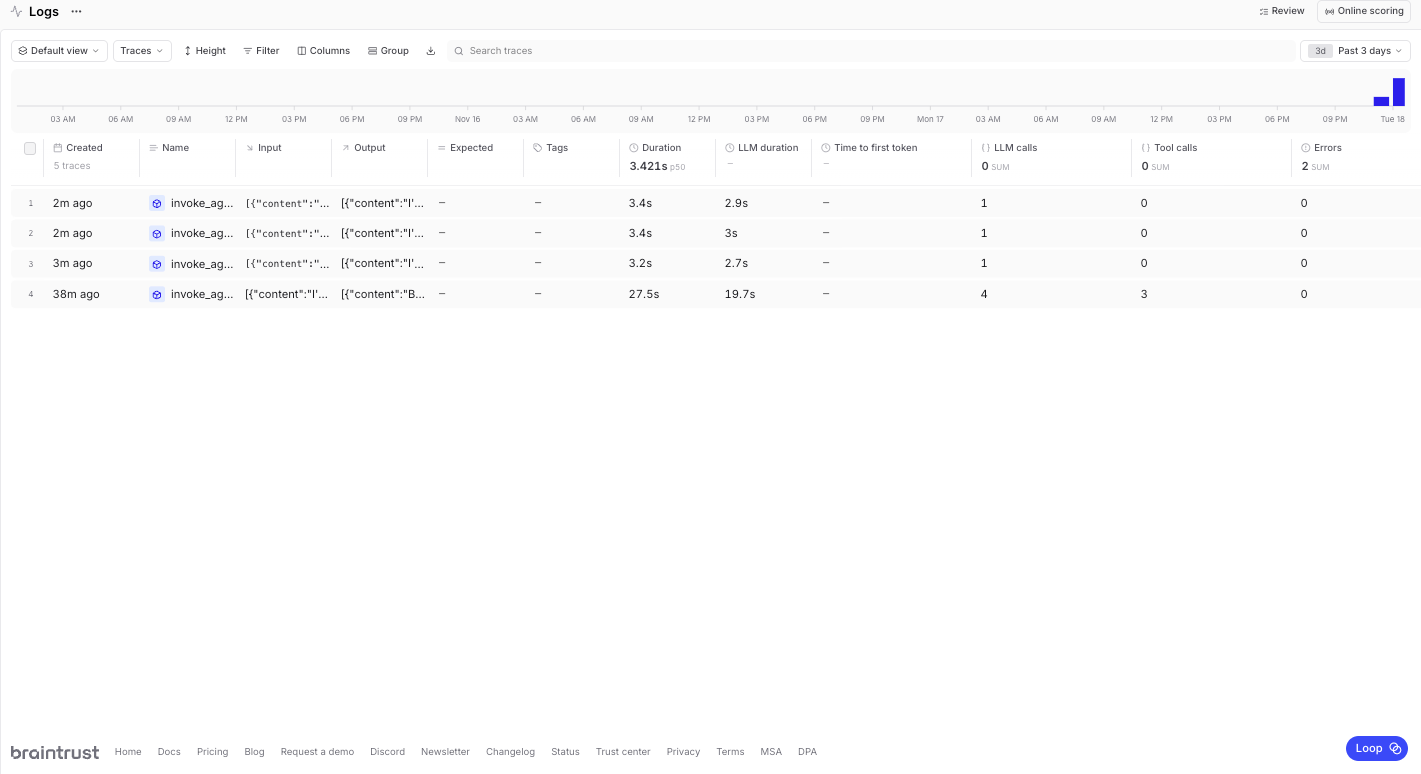
When you invoke the agent, logs are automatically generated for each invocation. Each agent interaction is captured in its own trace, with individual spans for tool calls and model interactions. To view your logs, navigate to your Braintrust project and select the Logs tab. The trace view shows the full execution tree, including all agent interactions, tool calls (such as web_search), and model invocations with their latency and token usage.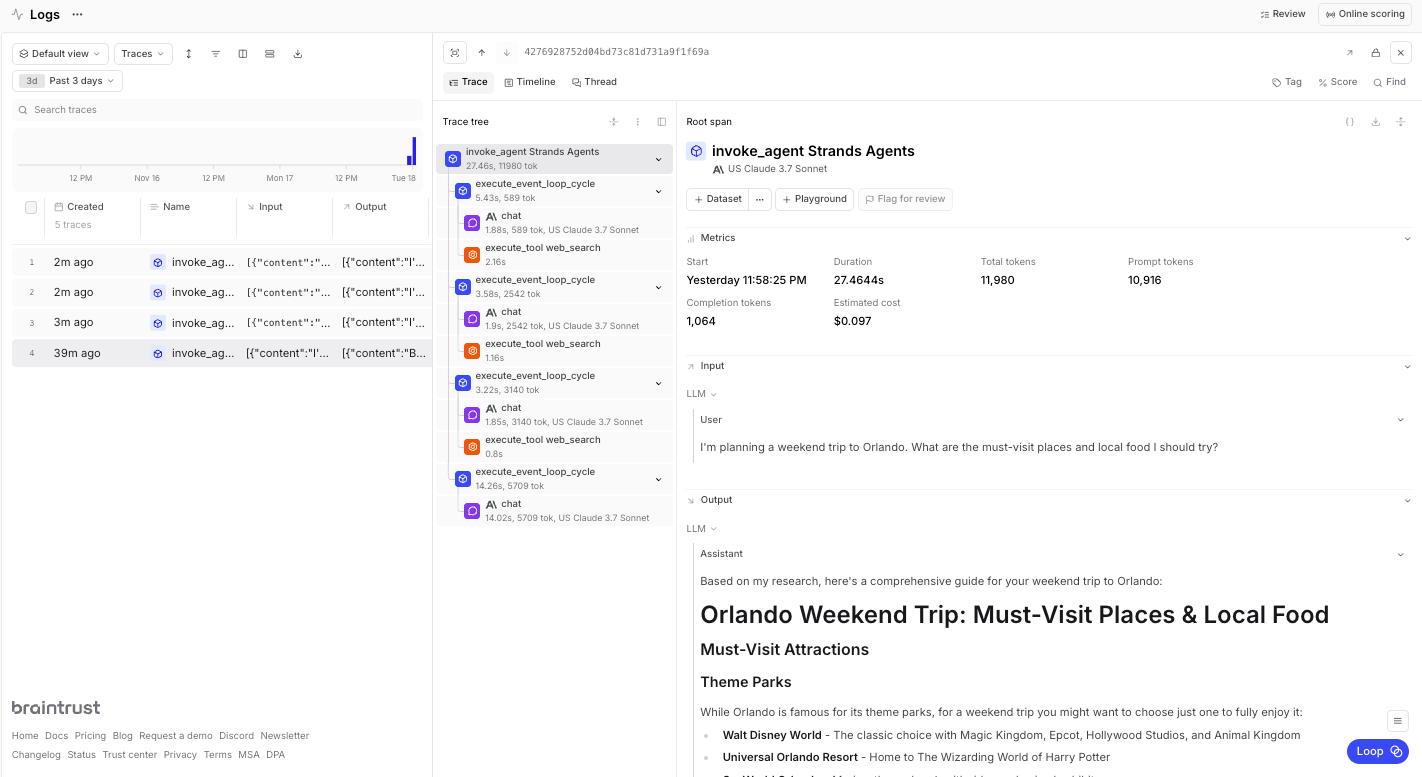
Cleanup
When you’re finished, you can clean up the resources you’re not using anymore. This step is optional, but a best practice.Next steps
Now that you have a working Strands Agent deployed to Amazon Bedrock AgentCore Runtime with full observability, you can build on this foundation:- Add more tools to expand agent capabilities beyond web search
- Create custom scorers to evaluate agent performance and accuracy
- Build evaluation datasets from production logs to continuously improve your agent
- Use the playground to test and refine agent behavior before deploying updates